Buvt, How it works
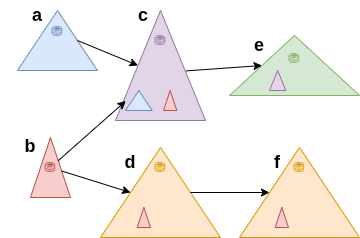
"Own files" are the files that originate in the tree itself (and not from upstream locations).
Ex: In tree b, the purple area represents the "own" files.
Ex: In tree b, the purple area represents the "own" files.

Settings data. (prefixes to variables)
Syncing a "Location" (tree) to its db (database).
Part of how the software works is that the hashcodes of the files have to be calculated. The hashcodes then have two purposes:- They are used as keys when syncing between trees.
- They can be used to verify the integrity of the files at a later time.
Every "Location" (tree) has the db in its top folder (see image). It contains each files filename, hashcode, modification time and size. The db contains data about its "own" files as well as any subtrees from upstream locations. (again see the image.)
When syncing to (updating) the db, only the locations "own" files are considered, the db-entries (files) that have their origin in upstream locations are left untouched.
Those files which had their hashcode recalculated, have their SM (size and modification time) "uniquified" with respect to the hashcode. That is the timestamp may be changed for certain files. So then the SM can be used as a unique key to a certain hashcode (within the "own" files). It is the fact that SM can be used as a key to a certain hashcode that allows the updating of the db to be done differentially.
Note! SM uniquely identifies a hashcode, but not to an individual file, so for example file-copies (same hashcode) can have the same modification time, without having the time changed.