Me describing the problem:
 The first responses are about updating the firmware.
And also how to communicate with the servo:
The first responses are about updating the firmware.
And also how to communicate with the servo:
![dynamixelPi.jpg]()
Magnus Andersson
Aug 19

to contactus2
Hi

Right after the servo is connected to power, it works great, shifting its position as it should.

However after about 5 minutes it stops correcting its position in one (CW) direction.

Ex:
If the servo is at 2048 (two bars on the wheel is pointing downwards) and one sets the position to:
* 4095, then it works.
* 0, then nothing happens, and there is basically no resist when turning the wheel.  However If I turn CW (towards 0) it will begin to resist as 0 is reached.

If I disconnect the servo from power and let it rest for about 5 minutes (cooling down?) then when connecting it, it works as it should (in both directions) again.

I got it August 1, and I've only used for testing so far, not connected to any load.


Best Regards Magnus Andersson
- PC with USB2Dynamixel (as robotis wants me to do)
- PC with RS232-ttl-converter and circuitry as in the image (although with a 10k pullup resistor).
- Raspberry Pi and circuitry as in the image (although with a 10k pullup resistor).
ROBOTISCHANNEL .
Aug 22

to me
Dear Magnus,

Thank you for your email and sorry about the problem.

We recently found a bug causing the similar issue and have fixed it on Aug 18th. Please restore the F/W and let us know if the problem still exists.

May you let us know your current location?
If you are based in South/North America, please contact our CS team (cs@robotis.com) in the US.

Best regards,
Magnus Andersson
Aug 22

to ROBOTISCHANNEL
As for my location, I live in Sweden (in Europe).

Do one need a USB2Dynamixel to update the firmware?

I assume that the things it do is: (or am I wrong)
* add a serialport with selectable output levels
* make the signal half duplex.


Maybe one could do it with any of this two methods;

1) As I used a Raspberry pi, to control the servo. So I thought upgrading might be as easy as streaming an upgrade-file to the servo. (Because then I could stream that data from the Raspberry pi)

2) With a RS232-to-ttl converter (Which I already have ordered from EBay) one could convert the signal levels, then one could use circuitry like this: http://forums.trossenrobotics.com/attachment.php?attachmentid=5804&d=1421436875&thumb=1 to make the signal into a half duplex signals.
A problem might be that whatever is sent by the computers txd-line would immediately come back on the computers rxd-line, which might cause a problem for any PC-software.
ROBOTISCHANNEL .
Aug 23

to me
Hi Magnus,

Thank you for your reply.

We meant to update the F/W of the MX-12W on Dynamixel Wizard. (How to update F/W)
If the problem is not solved, please give us more details about the system setting. Some images would be helpful to understand.

(FYI, we are unable to advise on program debugging or other manufacturer's products.)

Best regards,
Firmware is updated, but the problem remains:
Magnus Andersson
Aug 25

to ROBOTISCHANNEL
Now I've managed to upgrade the firmware, I think (its version 39, I forgot to check what it was before)

I didn't use the USB2Dynamixel though, I used a RS232-to-ttl converter and the same circuitry I linked to before (although with a 10k pullup resistor)

But the problem remain.

I also noticed that if I hold a torque on the wheel (with my hand) then there is a buzzing noise coming from the servo maybe 10 seconds before it stops working.


I also disconnected the connection wires after the position is set (that is leaving only the GND and 12V be connected to the servo), and the servo behaves the same way.
While checking for bad solder joints, all of a sudden the servo works great:
Magnus Andersson
Aug 25

to ROBOTISCHANNEL
OK, so now I took the servo apart, thought I'd check if there where any bad solder joints. So I took a needle and pushed on all pins to see if they moved. I can't say that I saw any pin move, but when I assembled the servo again, the problem was gone, at least I can let the servo go for an hour without the problem appears, so perhaps there was some pin that hadn't wetted properly.

So I guess the problem is solved, at least for now.

Thanks for the help anyway.
Aimee Han <aimee@robotis.com>
Aug 26

to me
Dear Magnus,

Thank you for your feedback.
We are glad that the problem is solved (for now).

Which pins do you think they were not fixed properly?
If the problem occurs again, please kindly send us a photo for our reference.

Thank you!

Aimee Han
ROBOTIS CO., LTD
www.robotis.com

#1505 Ace High End Tower No. 3
145, Gasandigital 1-ro
Geumcheongu, Seoul, Korea
TEL: +82-70-8671-3116
FAX : +82-70-8230-1336
Unfortunately the problem comes back:
On Fri, Aug 26, 2016 at 8:58 AM, ROBOTISCHANNEL . <contactus2@robotis.com> wrote:


Magnus Andersson
Aug 26

to Aimee
The problem is back.

I tried to poke on the pins with a plastic pin, but without any luck.
They wanted an image for their reference so I sent one:
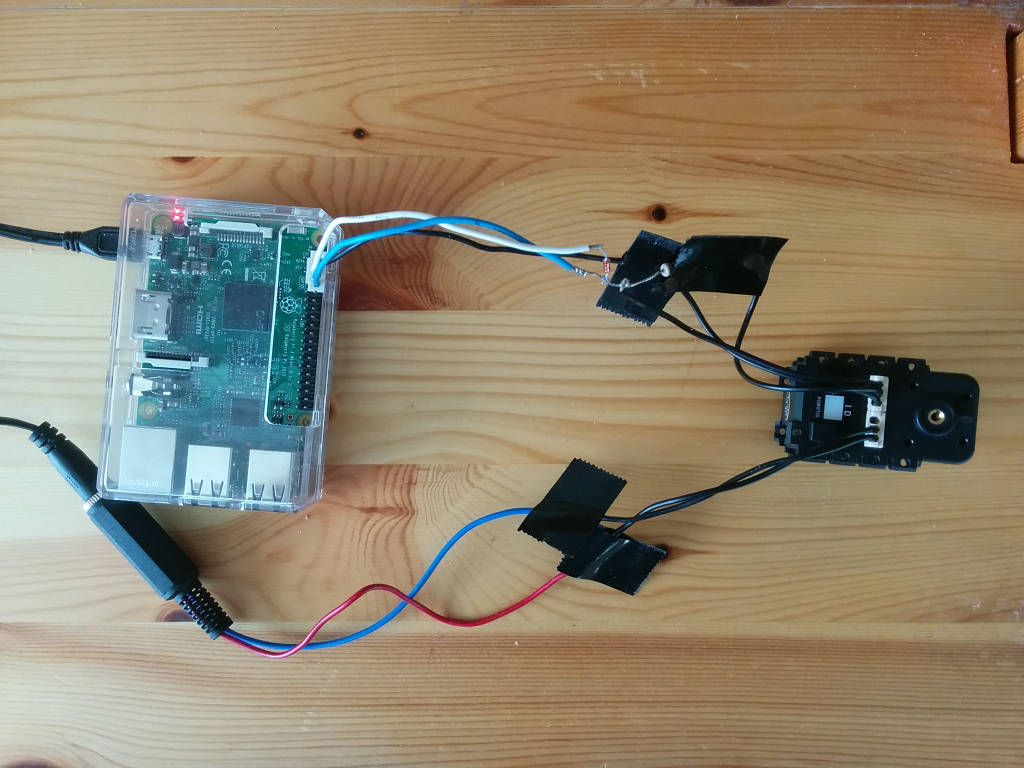
Magnus Andersson
Aug 26

to Aimee
An image of the servo connected to the raspberry pi: https://emagnusandersson.com/DynamixelSetup
I feel they are loosing their focus. Seams they are convinced its a communications problem, a point on which we disagree:
Aimee Han
Aug 29

to me
Hi Magnus,

Sorry but we are not quite sure which pin is causing the problem by the image you sent us.

May check if the servo works fine when it is not connected to the Rasberry Pi?
If you have an USB2Dynamixel, you may connect the servo directly to the PC and see it communicates.

Thank you.
Aimee Han <aimee@robotis.com>
Sep 6

to me
Dear Magnus,

I wonder whether you have solved the issue or not.
Please kindly let us know if there is anything I could help you with. :-)

Best,
Me suggesting they could send the circuit board only:
Magnus Andersson
Sep 6

to Aimee
No it still stops working after a while.

You could send a new circuit-board. Although use ordinary mail in like a padded envelope, don't use DHL, because they are only expensive and awkward towards non-corporate receivers.
Aimee Han <aimee@robotis.com>
Sep 9

to me
Dear Magnus,

Sorry for my late response.

Unfortunately we cannot provide PCB of Dynamixel separately.
Originally you should send it back to us for repair but let me check if we have a refurbished MX-12W for you.
Please let me get back to you on Monday.

Thank you!
Magnus Andersson
Sep 10

to Aimee
OK but if you choose DHL, could you write 0 value or "gift" or something, otherwise I have to pay 25% of the value in tax/customs plus a 8 USD fee to DHL for handling the tax.
Aimee Han <aimee@robotis.com>
AttachmentsSep 12

to me
Hi Magnus,

We will undervalue the actuator ($1), ship it as a sample via DHL.
May you kindly ask you to cover the freight charge? Please find attached invoice.

Thank you.

Attachments area
I think ($42.94 + $6) *1.25 tax (=$61) is too much. See also DHL Review for the extra fees.
Magnus Andersson
Sep 12

to Aimee
Actually I had my sights on modifying a standard servo, and $42.94 is a bit much, so I think I'll skip this offer.

Best regards Magnus
Aimee Han <aimee@robotis.com>
Sep 13

to me
Hello Magnus,

Sorry for the shipping cost. Please let us know if there is any other things we could help with.

By the way,
We would like to learn about the project you are currently working on.
Also, we found your name HERE and would like to know more about you and your work. If you do not mind, may you give us the information of yourself?

Are you willing to share your work using our Dynamixel on SNS?

Thank you.
Magnus Andersson
Sep 13

to Aimee
Its just a hobby project.
I'm not sure its me they refer to in the link, Magnus Andersson is a really common name here.

But thanks for the interest
Aimee Han
Sep 28

to me
Dear Magnus,

Sorry for my late reply.

Oh, then we must found a wrong person.
We always welcome hobbyists to play with our servos.

Do you have a plan to purchase anything from us in the future?
If yes, please let me know in advance. I will send you a refurbished MX-12W servo together with your order. :-)

Thank you.